2013年9月29日 星期日

3DO模擬器 4DO v1.3.2.3


3DO模擬器 4DO 發布新版,更新如下:

  • Fixed file extraction – File extraction from the file browser was not functioning because of a missing DLL from the released 1.3.2.2 files.
  • File browser tweaks – Users can now cancel copy operations, and basic progress indicators have been added.
  •  

    M64Py v0.1.6


    這款N64模擬器是來自於 Mupen64Plus ,因為Mupen64Plus沒有GUI介面造成操作不便,所以有了這款整合介面的模擬器誕生,當然骨子裡還是Mupen64Plus...

    * SDL2 support
    * option to disable screensaver when emulator is running
    * option to keep aspect when resizing window
    * LoadFrom/SaveAs actions for state files, PJ64 states are supported

    http://m64py.sourceforge.net/


    RetroArch 0.9.9.6 Megapack


    多機種模擬器  RetroArch 發布了一個 0.9.9.6的整合包,更新如下:

    These are megapacks, which include RetroArch, many libretro cores and shaders.

    http://themaister.net/retroarch.html

    2013年9月23日 星期一

    Wii/NGC/Triforce模擬器 Dolphin 4.0

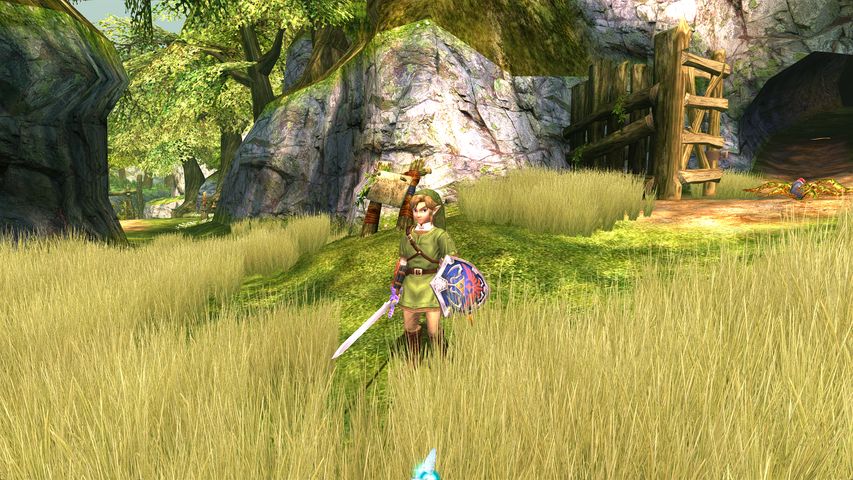
    The Legend of Zelda: Twilight Princess
    海豚終於更新了.......大讚!!!

    Update: a few hours after release, a bug causing crashes with Windows x64 and Single Core mode was found by testers. Single Core mode is not used for regular gameplay but is usually required for TAS and NetPlay. While it only affects a few specific use cases of the emulator, we still consider this a critical issue and we will release a Dolphin 4.0.1 version fixing this bug. Sorry for the inconvenience.

    On behalf of the Dolphin Emulator development team, I am pleased to announce the release of Dolphin 4.0, the newest major release of the most compatible and most performant GameCube and Wii emulator for PC. Dolphin 4.0 is a special release for all of us, since it also marks the 10 years anniversary of the project, first unveiled by Henryk Rydgård (ector) in September 2003.
    Dolphin 4.0 can be downloaded for Windows (x86 or x64), Mac OS X (>= 10.7) or Ubuntu 13.04 from our official website: dolphin-emu.org.

    Changelog

    With about 2500 changes since Dolphin 3.5, Dolphin 4.0 is a big release with the addition of several new major features:
    Beta support for the Wii official online multiplayer (Documentation)
    This is a feature that has been coming for a long time. More than two years ago, Matthew Parlane and Shawn Hoffman started working on emulating the Wii Wi-Fi networking API in order to run Wii online multiplayer games inside Dolphin. While it was not an easy change in itself, it also required a lot of modifications to core components of the emulator to be implemented properly (for example asynchronous IPC HLE) and a lot of debugging. It is now working well enough that we are releasing it to the public as a beta: don't expect everything to work, but popular games like Mario Kart Wii or Super Smash Bros Brawl can be played online right now.
    Alpha support for ARM/Android
    About two years ago, Ryan Houdek began the implementation of an ARM port of Dolphin, designed to run on powerful mobile phones and other ARM devices in the future. After a long time spent making Dolphin work well on both ARM and x86, Dolphin can now emulate GameCube and Wii games on recent Android phones. This support is still in early alpha stages: crashes happen, it's slow on Qualcomm hardware because of graphics drivers issues, and it is still missing a ton of features. Nowadays, Dolphin on Android is a two man project: Mathew Maidment is helping Ryan with the UI and making the Android version actually usable.
    Global User directory on Windows (Documentation)
    This is not exactly a major feature, but it is a big change in how Dolphin works on Windows, and requires user interaction to move from the old configuration system to the new one. Before 4.0, Dolphin configuration was stored next to Dolphin.exe, often causing issues when upgrading to a new version of Dolphin. New versions of Dolphin use a centralized location to store the configuration for all builds, usually My Documents\Dolphin Emulator. The documentation article linked above explains the details of this move, as well as what you need to do to migrate your old configuration to the new system (if you were using Dolphin before).
    New AX DSP HLE emulation code
    DSP HLE is the main audio emulation technique used in Dolphin. Before 4.0, it was extremely inaccurate and full of bugs, mostly due to how it was implemented. Dolphin 4.0 introduces a full rewrite of the audio emulation used in 99% of games, fixing hundreds of audio related bugs in Dolphin. On the flip side, it is now required to run a game at full speed to get full speed audio out of it, which is a direct consequence of fixing these bugs.
    A lot of more minor changes were also integrated in that new Dolphin release:
    New look
    A new look has been designed by MaJoR for Dolphin (new icon, new icon theme) and implemented on a new version of the Dolphin website by Pierre Bourdon.
    Wii Balance Board and GC Steering Wheel support
    Support for these two devices was added respectively by Matthew Parlane and skidau. The Wii Balance Board is not emulated and requires the real device to be used.
    Wii Remote support improvements
    Wii Remote background scanning was implemented to more closely match how a real Wii detects remotes, and support for -TR (Wii Motion Plus Inside) remotes was implemented for Mac OS X. A new documentation guide about Wii Remotes on Dolphin was also written by MaJoR to help Windows users with Wiimote issues.
    Fastmem support for Linux and OSX
    Fastmem is an optimization for Dolphin's CPU emulation, which was previously only implemented on Windows. Adding Fastmem support on Linux and OSX boosted the performance by 15 to 20% on these platforms.
    New OpenAL audio backend
    This audio backend, written by skidau, supports three important features that are not implemented in other backends yet: configurable audio latency, surround sound using the information contained in the Dolby Pro Logic II encoding used by most GameCube and Wii games, and support for sound stretching to make audio slow down when a game does not run at full speed.
    OpenGL video backend rewrite
    The Dolphin OpenGL video backend was rewritten by Markus Wick in order to use newer features of OpenGL and be GLES3 compatible. As a result, the OpenGL backend is now the fastest Dolphin video backend on NVIDIA cards.
    NetPlay stability and usability improvements
    Before Dolphin 4.0, GameCube NetPlay was at best a curiosity. 4.0 added a lot of NetPlay related changes which makes it actually usable for most games, but sometimes with performance issues. Super Smash Bros Melee players are now using Dolphin for regular online NetPlay tournaments, and it just works. Read the official NetPlay guide for more information.
    Mac OS X support enhancements
    This release also adds a few small OS X improvements: the Dolphin DMG bundles are now signed by a valid developer ID and do not require you to disable Gatekeeper to be used. The emulator is also Retina Display aware and handles the logical scaling better on these screens.
    Icon themes support
    In addition to shipping with a new default icon theme, Dolphin now allows you to make your own themes and share them with other people.
    https://dolphin-emu.org/

    2013年9月22日 星期日

    PCE/PCE-CD模擬器 Ootake Ver 2.71

    PC上最好的PCE/PCE-CD模擬器 Ootake 發布新版,更新如下:

    2.71
    - With Windows8, when the dialog was displayed, the bug that the error had
        occasionally gone out by some PC environment was fixed.
    - When using it in an old PC environment (model to which a graphic chip did
        not support shader 3.0), the bug of which the initialization error of
        Direct3D had gone out was fixed.
    - With a little power PC environment, at the reload of a game, the bug that
        the first sound did not occasionally play a little was fixed.

    2.70
    - The sound processing has been improved. And, the balance of the overall
    sound has been readjusted. Perhaps, I think that tone quality went up
    in a lot of PC environments.
    - "DirectSound7", "DirectSound9", and "XAudio2" were added to the Audio
    menu. This selection changes tone quality (Because the mixing processing
    method changes). Encouraging is "DirectSound7 Static" (default from
    v2.70. the compatibility of it with the wave memory sound is good.)
    * This is a change only at playing. The WAV data of the capture(Output
    WAV file) is the same.
    * Please update DirectX to the latest one if the error goes out when
    "XAudio2" is selected.
    http://www.microsoft.com/en-us/download/details.aspx?id=35
    - In Baseball Games, the ball count is displayed in order of BSO (BALL,
    STRIKE, and OUT). (the display positions is swapped in real time with
    Ootake)
    Correspondence Games: "Power League (World Class Baseball (U)) Series",
    "World Studium Series", "Korega Pro Yakyuu Series", "Naxat Studium",
    "Eikan ha Kimini", "Baseballer", and "ROM ROM Stujium".
    * It is possible to release it by "CPU->Swap STRIKE & BALL" menu.
    - The timing of the CD-DA sound and the image display was brought close to
    the movement of a real machine. Execute "Audio->Adjust CD-DA->
    Adjust CD-DA Auto Set" menu once when you want to match it to the optimum
    value of timing.
    - The speed and timing were brought close to the movement of a real machine.
    In the title screen of "Aurora Quest - Otaku no Seiza", the problem of the
    pad input was solved.
    In the stage 5 of "Rayxanber II", the problem that had occasionally
    stopped was solved.
    In "Mugen Senshi Valis", the problem that had not occasionally started
    with some PC environment was solved.
    In the talk scene of "Ys IV", the timing accuracy of the voice and the
    picture has risen.
    - In "Rayxanber II", "Ginga Fukei Densetsu Sapphire", and "Eikan ha Kimini",
    There is a problem that noise has entered tune begining of some music
    tracks. (perhaps, it was a mistake of the CD-ROM production at the sale
    that time). Ootake v2.70 beautifully performs these.
    - When playing at full-screen, the bug that [R]key(display of the game that
    had been played recently) did not work was corrected.
    - In some PC environments, in the dialog that selects the full-install CD
    games, the problem that "install" folder had not been occasionally
    developed was solved.
    - In "Rayxanber II", the problem that TurboButtun(AutoFire) function was not
    occasionally effective was solved.
    - In the opening demo of "Tenchi Muyou! Ryououki", the problem to which the
    screen was advanced early was solved.
    - In the winning message of "Garou Densetsu II", the problem to which the
    screen was advanced early was solved.
    - In the demo of "The Pro Yakyuu Super '94", the problem that the lower
    right of the screen occasionally fell into disorder was solved.
    - When "Battlefield '94 in Tokyo Dome" is started, PCE's 6-button pad is
    connected by the automatic operation.
    - Additionally, a detailed part has been improved and corrected.

    http://www.ouma.jp/ootake/

    2013年9月21日 星期六

    SEGA~~NEW or NEXT !!!

    SEGA~~♫  還有多少人記得SEGA MD-CD的開機音樂?我的最後一台家用主機是Dreamcast,之後的PS(x)~XBOX(x)~NGC~Wii(x)一部都沒買,因為找不到以前遊戲的靈魂了。

    關於SEGA重返家用機戰場的傳言不斷,ファミ通No.1289 的附錄 SEGA CONSUMER 30th ANNIVERSARY BOOK 收錄了對石川雅美的訪問內容 :

    「アーケードゲーム以外にも新しいプロダクトを立ち上げる【Nプロ研究開発部】で、
    新しいものを立ち上げようとがんばっています。”N”は”NEW”や"NEXT"を意味するのですが、メガドライブ級のニュースをお届けしたいですね」
     
    石川雅美曾參與過許多SEGA硬體開發工作,目前他正在(Nプロ研究開発部)工作中,N代表的是NEW or NEXT,文中提到  アーケードゲーム以外 ...... メガドライブ級.......???
     
    向在日本SEGA的朋友詢問後得到的結果...........相當晦暗不明!!朋友只是笑笑不願提供進一步情報,這也代表消息封鎖得相當嚴密。SEGA Return之日也許...?
     
    10月底或許就會有更多消息了......??!!


    2013年9月20日 星期五

    MAMEUIFX 0.150


    MAMEUIFX 隨著 MAME更新至 0.150,更新如下:


    Updated to MAME 0.150

    * Changelog from 0.149.2:

    - Added "DISPLAY NO ROMS GAMES ALWAYS AS AVAILABLE" option to the GUI
    ("Interface Options", enabled by default - This will make "Pong (Rev.E)" game always available)
    - Added support for MR.DO'S NIGHTMARE (As requested via PM)
    - Added support for OFFICIAL HISTORY.DAT version
    (The one specific for MAMEUI is no more needed)
    - Changed colors of some dialogs: "ABOUT, INTERFACE OPTIONS" and so on
    - Implemented COLORED OPTIONS HIERACHY in the GUI
    • BLACK = ALL GAMES OPTIONS
    • PURPLE = ALL HORIZONTAL GAMES OPTIONS
    • BLUE = ALL VERTICAL GAMES OPTIONS
    • ORANGE = ALL VECTOR GAMES OPTIONS
    • RED = ALL SOURCE GAMES OPTIONS (e.g. all CPS1.C games)
    • GREEN = SPECIFIC SINGLE GAME OPTIONS
    - M1FX 5.0 released. Fixed nasty bug which caused missing sound on some systems
    http://mame32fx.altervista.org/home.htm